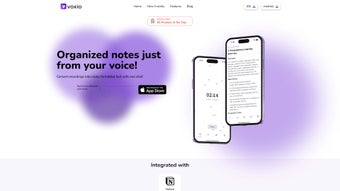

Download Voxio – AI‑Powered Voice‑to‑Text Converter for Windows, Mac, Android & iOS
Overview
Voxio is an AI‑driven voice‑to‑text conversion application that turns spoken recordings into clean, structured text with minimal effort. Designed for professionals, students, and anyone who needs to capture ideas quickly, Voxio saves the original audio while generating a written transcript that can be edited, formatted, and exported. Its integrated template library lets you produce summaries, meeting minutes, or custom‑formatted documents in seconds.
The built‑in grammar engine removes repetitions, corrects punctuation, and improves readability, so the output feels polished without additional proofreading. Voxio also supports multiple languages, making it a versatile tool for global teams and multilingual users. Seamless integration with Notion means that converted notes appear instantly in your workspace, streamlining workflow and eliminating the need to copy‑paste manually.
Whether you’re on an Android phone, an iPhone, or a desktop environment, Voxio offers a secure, privacy‑first approach: recordings are encrypted during upload and stored only on your device unless you choose to sync with cloud services. In short, Voxio delivers a reliable, fast, and user‑friendly solution for turning voice into text, helping you stay organized, boost productivity, and keep every idea at your fingertips.
Key Features
- AI‑Enhanced Transcription: Advanced speech‑recognition models deliver >95% accuracy for clear audio.
- Multi‑Language Support: Transcribes in over 30 languages, including English, Spanish, Mandarin, and French.
- Template Library: Pre‑built formats for meeting minutes, summaries, blog drafts, and custom templates.
- Grammar & Clarity Engine: Automatic removal of filler words, duplicate sentences, and grammar corrections.
- Audio Retention: Original recordings are stored alongside transcripts for reference.
- Notion Integration: One‑click export of transcripts to Notion pages or databases.
- Cross‑Platform Availability: Native apps for iOS, Android, Windows, and macOS.
- Secure Cloud Sync: Optional encrypted backup to keep data safe across devices.
- Offline Mode: Record and transcribe without an internet connection; sync later.
- Custom Vocabulary: Add industry‑specific terms to improve recognition accuracy.
Installation & Usage Instructions
Getting started with Voxio is straightforward, regardless of your operating system. Follow the steps below to download, install, and begin converting voice recordings into text.
Step 1: Download the Installer
Visit the official Voxio website or your device’s app store. For Windows and macOS, click the “Download for Windows” or “Download for macOS” button to receive a secure .exe or .dmg file. For mobile devices, search “Voxio” in the Apple App Store or Google Play Store and tap “Install.” The download size is under 80 MB, making it quick even on slower connections.
Step 2: Run the Installer
On Windows, double‑click the .exe file and follow the on‑screen wizard. macOS users should open the .dmg, drag the Voxio icon into the Applications folder, and launch the app. Mobile installations are handled automatically by the store after you tap “Accept.” During installation, you’ll be prompted to grant microphone and storage permissions—these are essential for recording and saving audio files.
Step 3: Create an Account (Optional)
While Voxio works perfectly offline, creating a free account enables cloud sync, Notion integration, and access to premium templates. Sign up with an email address or use Google/Apple Single Sign‑On for convenience. Your data is encrypted end‑to‑end, and you can delete your account at any time.
Step 4: Record or Import Audio
Launch Voxio and tap the red “Record” button to start a new session. You can also import existing recordings from your device’s library. Voxio automatically detects the language and starts processing in real time. For longer recordings, the app splits the audio into manageable chunks to maintain high accuracy.
Step 5: Choose a Template & Export
Once transcription finishes, select a template from the library—such as “Meeting Summary” or “Blog Draft.” The AI will re‑format the raw text to match the chosen structure, applying headings, bullet points, and proper punctuation. When satisfied, export the document to PDF, DOCX, or directly to Notion using the “Send to Notion” button. You can also copy the text to the clipboard for use in other applications.
Step 6: Review & Edit (Optional)
Even with high accuracy, you may want to fine‑tune specific terminology. Voxio’s built‑in editor highlights uncertain words in yellow, offering alternative suggestions. Adjust as needed, then save the final version. All changes are stored locally and can be synced to the cloud if you have an account.
Overall, the installation process takes under five minutes, and the intuitive UI ensures that even first‑time users can start transcribing within seconds.
Compatibility & Pros / Cons
Voxio runs natively on Windows 10/11, macOS 10.15 or later, Android 6.0 and up, and iOS 13 or later. The application leverages platform‑specific speech‑recognition APIs for optimal performance, while also offering its own AI model for consistent results across devices. Whether you’re working on a high‑end desktop or a budget Android tablet, Voxio adapts to the hardware, providing smooth real‑time transcription without excessive CPU load.
Pros
- High transcription accuracy thanks to proprietary AI models.
- Multi‑language support eliminates the need for separate tools.
- Integrated templates speed up document creation.
- Offline mode ensures work continuity without internet.
- Secure encryption protects sensitive recordings.
- One‑click Notion sync streamlines knowledge‑base workflows.
- Custom vocabulary improves industry‑specific transcription.
- Lightweight installer (under 80 MB) and fast setup.
Cons
- Premium templates and cloud sync require a paid subscription.
- Real‑time transcription may lag on very low‑end devices.
- Audio quality heavily influences accuracy; noisy environments need external mic.
- Limited export formats (PDF, DOCX, Notion) – no direct PowerPoint export.
Frequently Asked Questions
Can Voxio transcribe audio in real time?
Yes. When you press the record button, Voxio streams the audio to its AI engine and displays the transcription as you speak. Real‑time results are available on all supported platforms, though performance may vary on very low‑end devices.
Is my data safe with Voxio?
Voxio uses AES‑256 encryption for both local storage and cloud sync. Recordings never leave your device unless you explicitly enable cloud backup or export to Notion. The company also adheres to GDPR and CCPA standards.
Do I need an internet connection for transcription?
No. Voxio offers an offline mode that stores the AI model locally. You can transcribe without internet, and later sync the results when you’re back online. Some advanced language packs require an initial download.
How does the Notion integration work?
After connecting your Notion account in the settings, a “Send to Notion” button appears on each transcript. Clicking it creates a new page (or appends to an existing one) using the selected template, preserving formatting and any attached audio files.
Is there a free version of Voxio?
Yes. The free tier includes basic transcription, up to 5 hours of monthly usage, and standard templates. Premium features like custom vocabulary, unlimited cloud sync, and advanced templates are part of the paid subscription.
Conclusion & Call to Action
Voxio stands out in a crowded market of voice‑to‑text tools by combining high‑accuracy AI transcription with practical productivity features such as template libraries and seamless Notion integration. Its cross‑platform availability, offline capability, and strong privacy safeguards make it a solid choice for anyone who regularly captures ideas verbally—whether you’re a busy executive, a student taking lecture notes, or a content creator drafting scripts on the go.
If you’re looking for a reliable, secure, and feature‑rich voice transcription solution, download Voxio today. Start with the free tier to test the accuracy, explore the template collection, and experience the convenience of instant note syncing. When you’re ready for more power, upgrade to the premium plan for unlimited usage, custom vocabularies, and advanced export options.
Ready to transform your spoken words into polished text? Click here to download Voxio now and enjoy a smarter way to capture, organize, and share your ideas.
Voxio delivers impressive transcription accuracy, an intuitive UI, and useful templates that save time. The Notion integration is a game‑changer for knowledge workers. Minor drawbacks include the limited export formats and the need for a paid plan to unlock the full feature set. Overall, it’s a top‑tier voice‑to‑text app for both casual and professional users.
- Pros: High accuracy, multi‑language, offline mode, secure, Notion sync.
- Cons: Premium cost for advanced features, export format limits.



.png)



